Code Completion
CodeBRT offers a code completion feature designed to enhance coding efficiency and accuracy. This document outlines how to configure and use the Code Completion Settings effectively.
Usage
Manual Trigger Configuration
This feature is an advanced code completion tool that allows users to manually trigger code suggestions. It'll cost more credits than the auto-triggered code completion feature. But provide more accurate and able to generate more complex code completions.
-
Usage
While coding, press the defined keybinding to trigger code suggestions instantly. And press "TAB" to use the suggestions.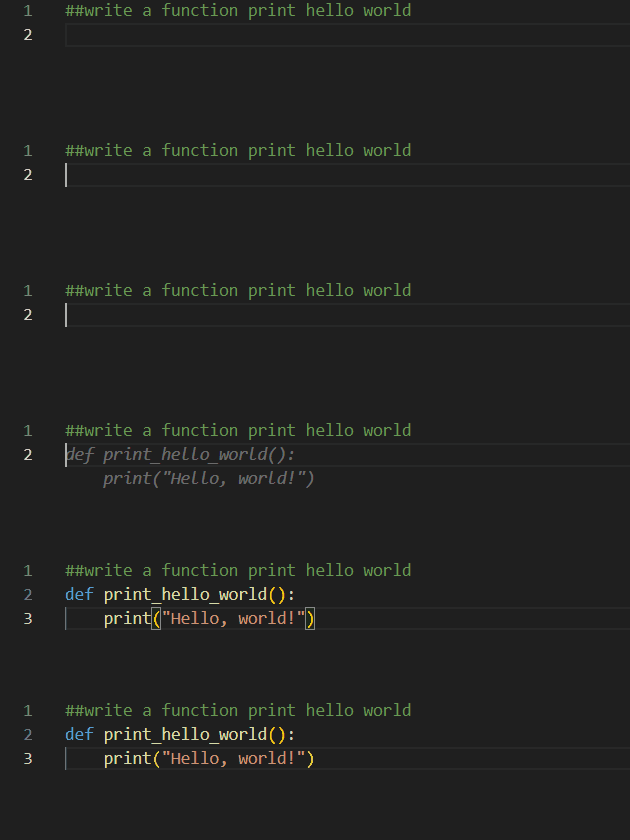
Auto Trigger Configuration
This feature provides fast and seamless code suggestions while typing. While typing, the code completion feature will automatically suggest code completions based on the context. We use a hole-filling model to provide code completions with efficient suggestions.
-
Usage
While typing, the code completion feature will automatically suggest code completions based on the context. Use theTABkey to use the suggestions.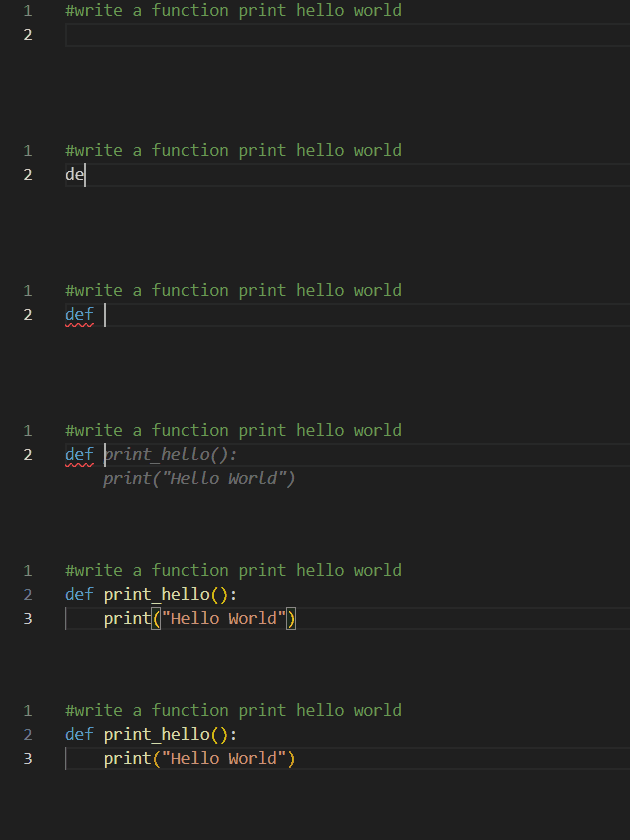
Status Bar
There is a status bar at the bottom of the code editor that displays the current status of the code completion feature.
- Status
The status bar displays the current status of the code completion feature. It will show whether the code completion feature is processing or ready to use.-
Ready

-
Processing

-